Frequently Asked Questions
Promote Your Ad
Please see how to sell fast page.
Ads with paid features typically receive more views than ads without. More views on your ads can lead to more engagement and a faster sale.
Placing an Ad
Click on the Post Your Ad button on the main navigation section and follow the instructions.
To upload a image during the ad placement process,
- drop files on the image box
- click on the browse files button in the image box under the Images section. A window will appear that contains a set a folders on your computer. Please choose the folder that contains the images that you would like to use in your ad. Find the images you wish to add, select them, and then click open. The images will be uploaded and will appear in your ad.
Recommended image size is (870x493)px
Image maximum size is 3 MB.
Allowed image type (png, jpg, jpeg).
You can upload up to 5 images.
Yes, ads are checked by the classifieds team. Payment is held once the ad is placed then processed once the ad has been moderated.
Yes, in an ongoing effort to improve user safety, users are required to register before posting ads
Please see how to sell fast page.
Checklist - Every classified should include:
• Type of sale
• Sale date or days and hours
• Price
• Make and model
• Size and colour
• New, used or reconditioned
• Service or warranty
• Delivery details
• Name, phone number,
• Address or directions to location
More and more buyers are using the Internet every day. As a seller, you can tap into the thousands of qualified buyers who use this trusted site for the ability to search locally by specific area, price range, and features to find a local item or service that suits their needs.
You can make it easy for them to find what you're selling by taking advantage of this site's capabilities and providing in-depth information such as detailed descriptions and multiple photos.
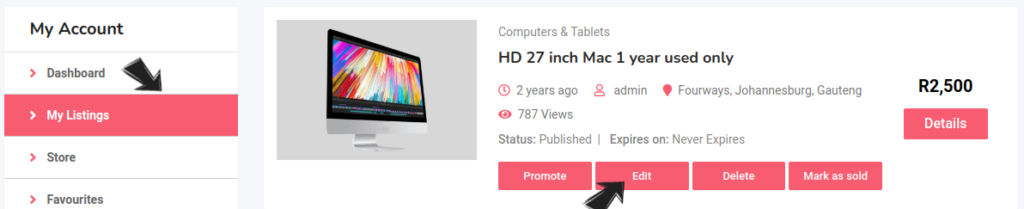
That’s okay, you can always add the photos at a later time, through your account. Click Edit under My Listings.
Possible reasons why you can't see your ad:
• Your ad has expired.
• Ad is under review. Reviewing ads can take up to 24 hours.
• Ad has been removed from the site due to a policy violation.
Please do not post ad into multiple cities, they will be marked as duplicates and may be removed from the site. Post ad in the most appropriate city, preferably where you are based.
Managing an Ad
Log in, click on My Listings, locate the ad that you would like to stop and click the Mark as sold button. If you want to completely remove your ad, click the Delete button.
You are able to make changes to the photos through your classifieds account
Yes. Upon logging in, go to My Account, click on My listings. locate the ad you want to edit, click on Edit.
Account and Passwords
Click on the identity logo on the top right of the main navigation menu and follow the prompts.
At the top right-hand corner, click the identity icon before the Post Your Ad button.
Click the forgot your password? link below the Login button. Provide your username or email address to receive the reset link.
Once you login to your account, go to the Account Details tab, click on the change password checkbox to update password.
Unfortunately, usernames cannot be changed.
You do not need to sign in unless you wish to view your booking history or update ads you created.
Payments
Due to the nature of placing a classified ad online, we do not generally offer refunds on listing fees. Once an ad is posted, the ad will immediately gain exposure to our visitors, however, no guarantees are made as to the success of the ad.